Tutorial 5 of 6
Import draw.io and Excalidraw, export, share
Intermediate 6 min
Open draw.io and Excalidraw files, export PNG, SVG and PDF, send a drawing to another usefulweb app, and share a board as a link.
Sketchboard reads diagrams from other tools and writes formats every program understands. It only reads the files you choose and never sends your board anywhere.
Import a draw.io or Excalidraw file
Choose File → Import draw.io or Excalidraw file… (or File → Open file…) and pick:
- a draw.io / diagrams.net file (
.drawioor.xml). Plain and compressed pages both work. - an Excalidraw drawing (
.excalidraw).
Before anything opens, a summary shows how many shapes, connectors and text labels were found and what was skipped. A file with several pages has a Page list, where you choose the page to import.
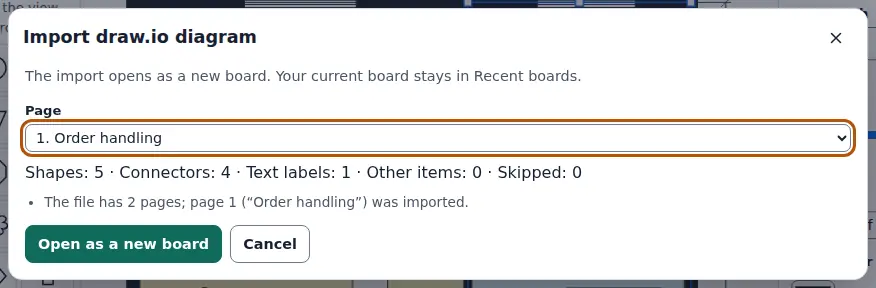
Open as a new board opens the import as a new board, and your current board stays under Recent boards….
What comes over:
- Shapes: rectangles, ellipses, diamonds, cylinders, documents, clouds, actors and the common flowchart shapes become the matching Sketchboard shapes. Unknown stencils become rectangles.
- Connectors: they stay glued to their shapes, with their route (straight, right-angled, curved), waypoints and arrowheads.
- Styles: colours, line widths, dashes, opacity, rotation, font sizes and alignment are kept. Labels keep their text but lose formatting such as bold.
- Excalidraw: bound text becomes the shape's label, arrows keep their bindings, freehand strokes stay strokes, and a rough drawing switches the board to the hand-drawn style.
- Images inside either kind of file are not imported.
Export
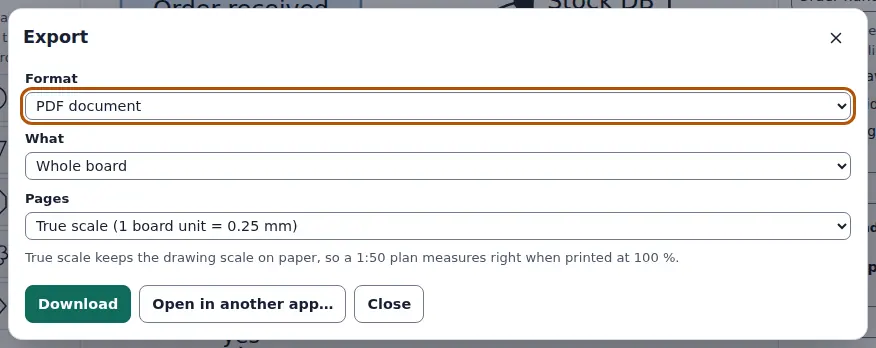
File → Export… offers:
- PNG image at 1×, 2× or 3×, with or without the background colour
- SVG vector image, which keeps sharp edges at any size; props are embedded
- PDF document: true scale for plans, fit on A4, A3 or US Letter, or one page per frame for slides
- Sketchboard board (
.sketchboard.json), the full board to open again
With a selection you can export Selection only. Open in another app… sends the image, SVG or PDF straight to another usefulweb app that accepts it, such as an image or document editor.
Share a link
File → Share a link… packs the whole board into a link. The board travels in the part after the #, which browsers never send to a server. Whoever opens the link sees a read-only copy with a Save a copy button. Big boards make long links, and the dialog warns you when a link may be too long for some chat apps. For those, send the board file or use a workspace (next tutorial).
Ready to try it?