 Diagrams, sketches and plans

Draw diagrams, flowcharts, mind maps and floor plans on an endless board.
Launch Sketchboard → Tutorials
Sketchboard is a drawing board for ideas: boxes, arrows that stay glued to their shapes, sticky notes, freehand pen and over a thousand props, in clean lines or a hand-drawn look. Libraries for flowcharts, UML and ER, networks, floor plans with walls, dimensions and a real-world scale, and mind maps with automatic layout. Import draw.io and Excalidraw files, export PNG, SVG and PDF, present frames as slides and share boards with your team.
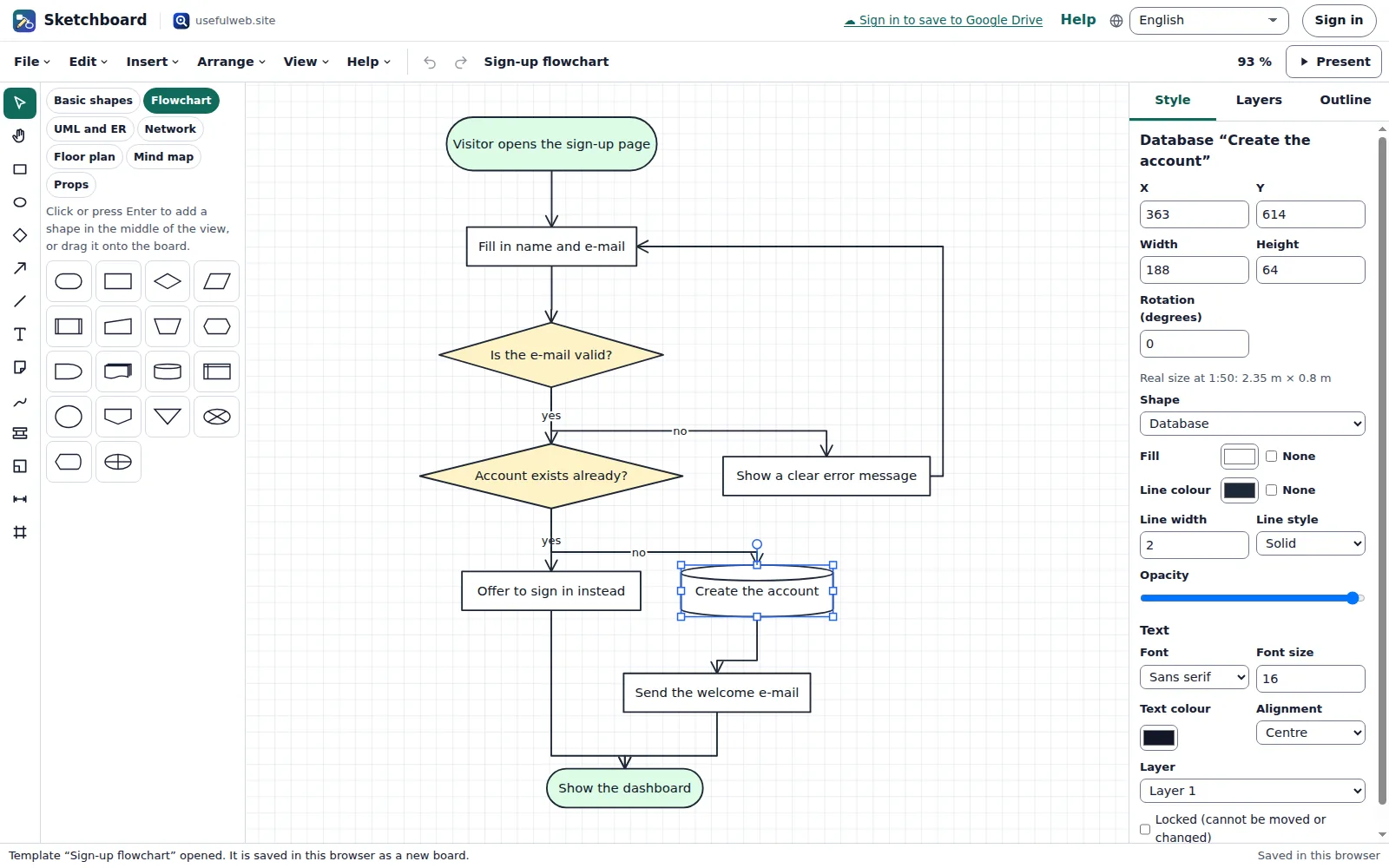
Screenshots
- Flowcharts with glued arrows
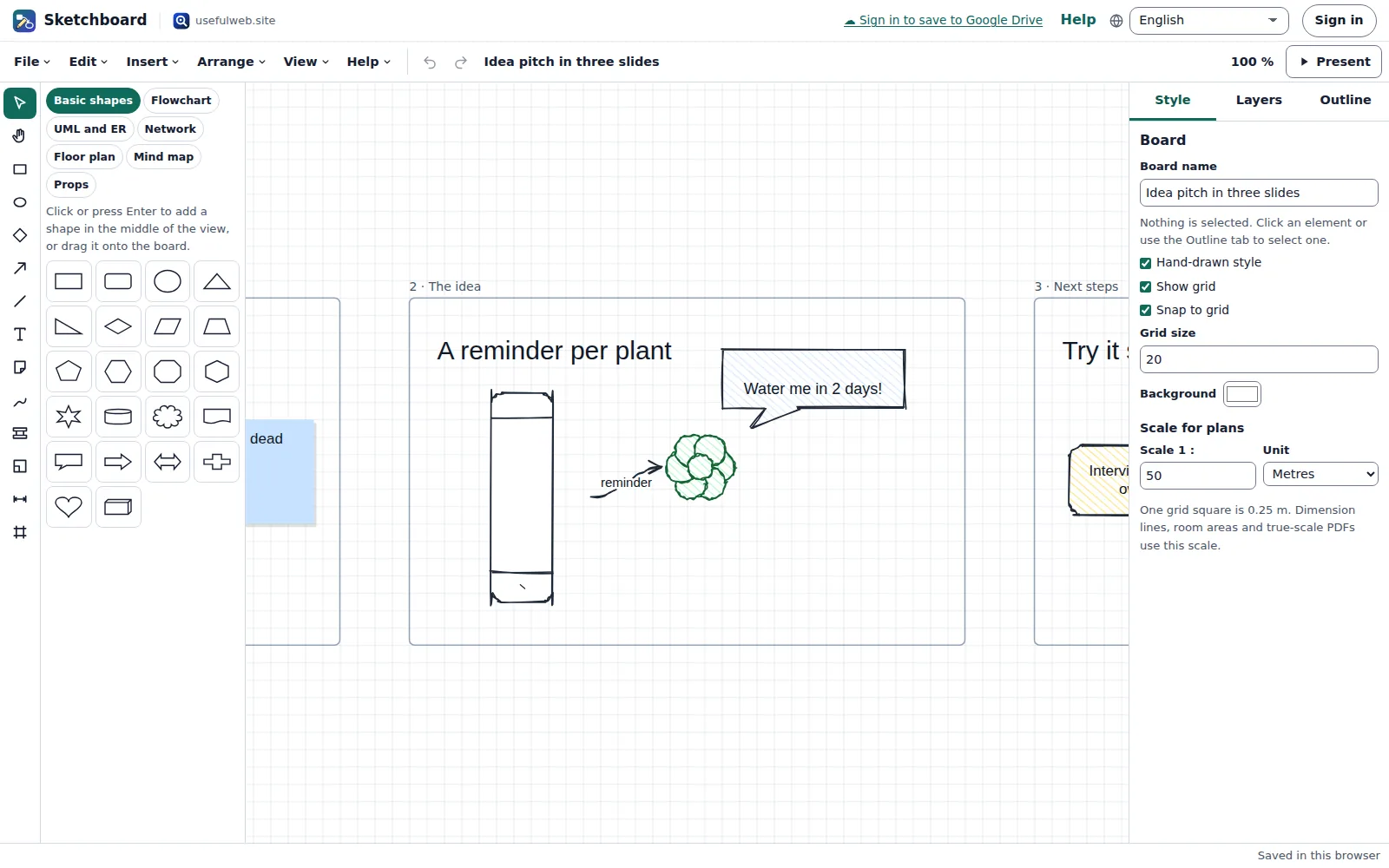 Hand-drawn style and frames as slides
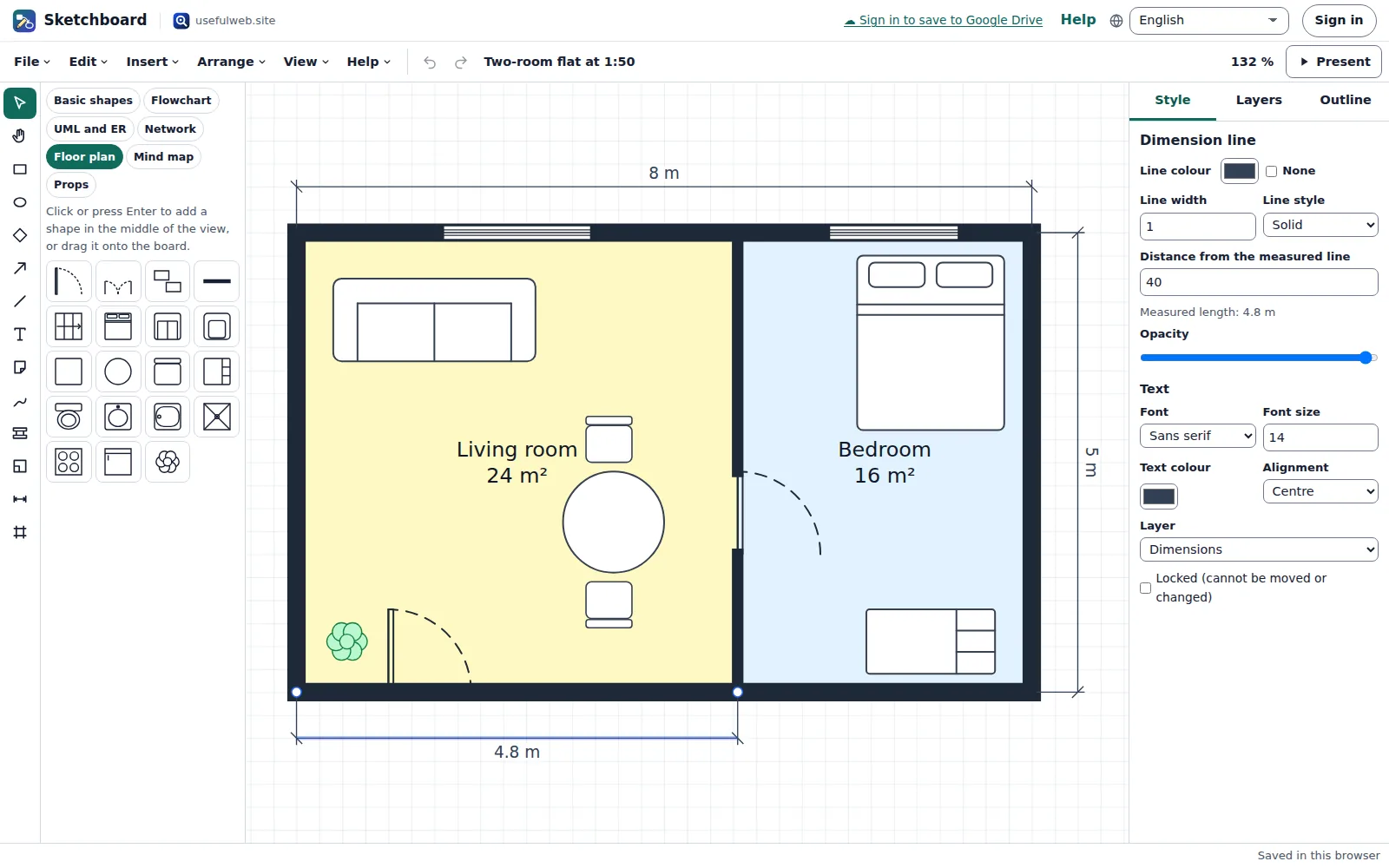 Floor plans to scale
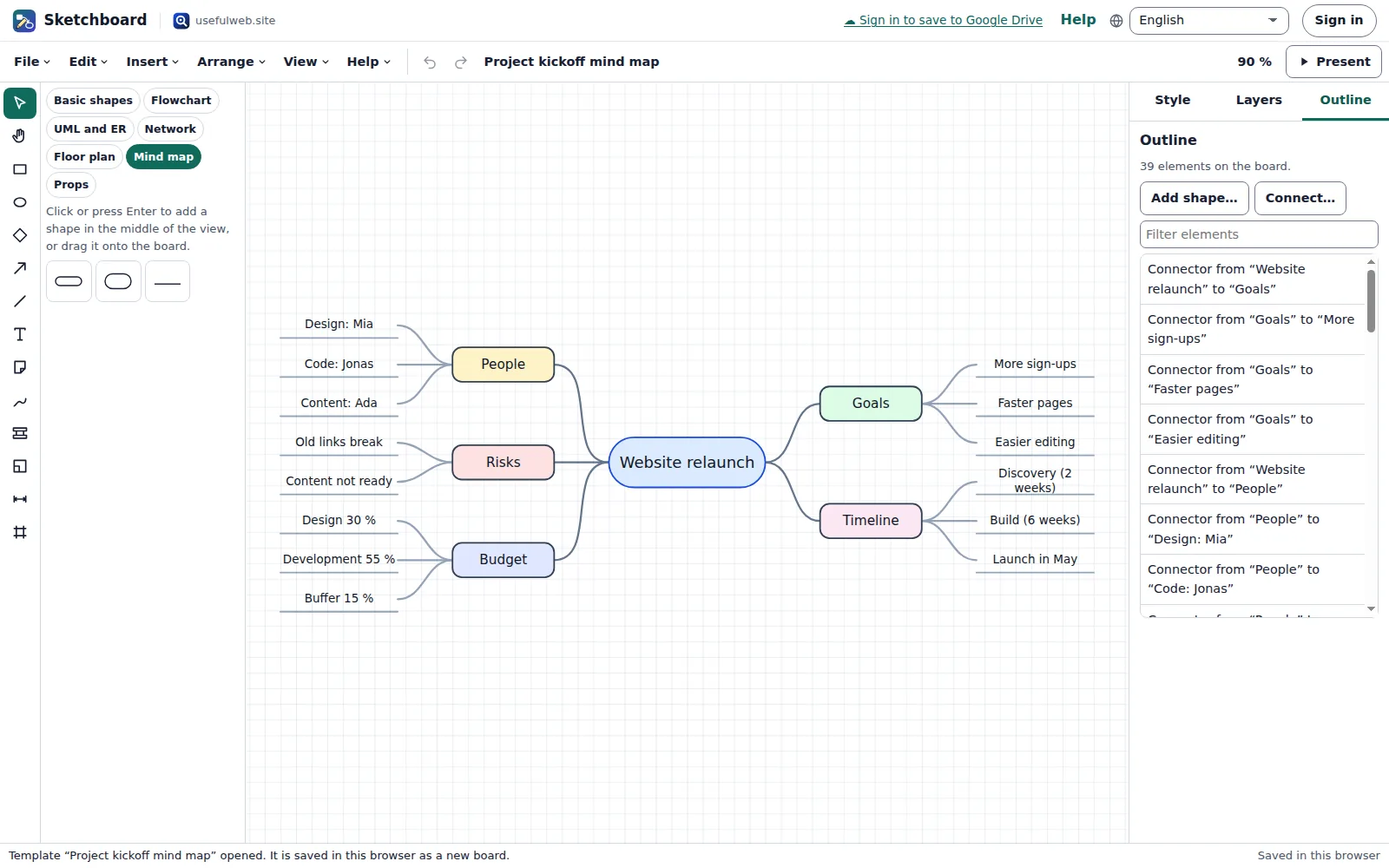 Mind maps and the Outline view
Features
Endless board
Pan and zoom freely, with a grid, snapping and smart guides that line shapes up with their neighbours.
Shapes for every diagram
Basic shapes from rectangles to clouds and cylinders, plus libraries for flowcharts, UML and ER, networks, floor plans and mind maps.
Arrows that stay attached
Straight, curved or right-angled connectors glue to a shape’s sides and route around other shapes when you move things. Over a dozen arrowheads, including crow’s feet.
Clean or hand-drawn
Switch the whole board between crisp lines and a sketchy, hand-drawn look with hatched fills. Exports look the same.
Text and sticky notes
Labels inside shapes, free text with four fonts and coloured sticky notes for quick ideas.
Freehand pen
Draw with the mouse, a pen or a finger. Strokes are smoothed so they stay clean at any zoom.
Arrange and style
Fill, line, dash, opacity, fonts, align and distribute, layers, groups, z-order, rotation, locking, copy and paste, undo and redo.
Floor plans to scale
Walls, rooms that show their area, doors, windows and furniture, and dimension lines in real units at a scale such as 1:50.
Over a thousand props
Search a library of transparent pictures by name or tag, browse themes, and drag them onto the board or press Enter.
Mind maps with auto layout
Add child and sibling topics with the keyboard; Sketchboard balances the map around the central topic. Flowcharts get a layered layout.
draw.io, Excalidraw and Mermaid
Open draw.io files (also compressed ones) and Excalidraw drawings, or type a Mermaid flowchart and get a laid-out diagram.
PNG, SVG, PDF and links
Export images and vector files, true-scale PDFs for plans, the board file, or a share link that carries a small board inside it.
Present with frames
Every frame becomes a slide. Present full screen and move through the slides with the arrow keys.
Fully usable by keyboard
The Outline lists every element with its text, position, size and connections, and lets you add shapes and connectors without a mouse.
Work together
Save a board to a shared workspace: changes of several people merge element by element, viewers get a read-only board.
API and MCP tools
Convert draw.io to SVG, turn Mermaid into diagrams and lay out graphs from scripts or AI agents with the same engine.


Templates
Start from a ready-made project and change it to fit.
Sign-up flowchart
A sign-up process with decisions, a database step and a loop back, laid out automatically from Mermaid text.
Project kickoff mind map
A balanced mind map with goals, people, timeline, risks and budget around one central topic.
Two-room flat at 1:50
Walls, rooms with their areas, doors, windows, furniture symbols and dimension lines in metres.
Office network
Internet, firewall, router, switch, server, backup storage, computers and Wi-Fi inside a labelled LAN frame.
Shop data model
Customer, order, order line and product tables joined by crow’s-foot relationships.
Idea pitch in three slides
A hand-drawn app idea on three frames with sticky notes and a reminder sketch, ready for presentation mode.
Built-in tools
Sketchboard uses these tools. Each one also has its own page and works on its own, in the browser, through the JSON API and through MCP.
- Sketchboard draw.io to SVG Sketchboard engineConvert a draw.io (diagrams.net) or Excalidraw file into a clean SVG and an editable board.
- Sketchboard Mermaid to Diagram Sketchboard engineTurn a Mermaid flowchart into a laid-out, editable diagram with an SVG export.
- Sketchboard Auto Layout Sketchboard engineTidy up a diagram automatically: layered flowchart layout or a balanced mind map.
For AI agents
Sketchboard runs on a deterministic engine. The same functions are available as tools with a JSON API and MCP, so scripts and AI agents get exactly the results the app shows.
- Sketchboard draw.io to SVG – Convert a draw.io (diagrams.net) or Excalidraw file into a clean SVG and an editable board.
Tool page ·POST https://sketchboard.usefulweb.app/api/v1/tools/sketchboard-drawio-to-svg/calculate· MCPsketchboard_drawio_to_svg - Sketchboard Mermaid to Diagram – Turn a Mermaid flowchart into a laid-out, editable diagram with an SVG export.
Tool page ·POST https://sketchboard.usefulweb.app/api/v1/tools/sketchboard-mermaid-to-diagram/calculate· MCPsketchboard_mermaid_to_diagram - Sketchboard Auto Layout – Tidy up a diagram automatically: layered flowchart layout or a balanced mind map.
Tool page ·POST https://sketchboard.usefulweb.app/api/v1/tools/sketchboard-auto-layout/calculate· MCPsketchboard_auto_layout
- MCP endpoint (Streamable HTTP):
https://sketchboard.usefulweb.app/mcp - Project file format (JSON Schema): https://sketchboard.usefulweb.app/project.schema.json
- OpenAPI description: /openapi.json · llms.txt · API & MCP
Build a project through the API, then open it in the app with a link to https://sketchboard.usefulweb.app/app#project=<base64url JSON>.
Import & export
Import
- Sketchboard board (.sketchboard.json)
- draw.io / diagrams.net file (.drawio, .xml; plain or compressed pages)
- Excalidraw drawing (.excalidraw)
- Mermaid flowchart text
- Share link (#board=)
Export
- Sketchboard board (.sketchboard.json)
- PNG image (1×–3×)
- SVG vector image (props embedded)
- PDF (true scale, A4/A3/Letter or one page per frame)
- Share link (#board=)
Keyboard shortcuts
| Keys | Action |
|---|---|
| V | Select tool (H pans, R rectangle, O ellipse, D diamond, A arrow, L line, T text, S sticky note, P pen, W wall, Q room, M dimension, F frame) |
| Arrow keys | Move the selection (Shift: by one grid step) |
| Enter | Edit the text of the selected element |
| Delete | Delete the selection |
| Ctrl + D | Duplicate |
| Ctrl + G | Group (Ctrl+Shift+G ungroups) |
| Ctrl + Enter | Mind map: add a child topic |
| Ctrl + Z | Undo (Ctrl+Shift+Z redo) |
| Ctrl + Alt + O | Open the Outline with every element |
| ? | All keyboard shortcuts (single-key shortcuts can be switched off there) |
Frequently asked questions
Where are my boards stored?
In this browser’s storage on this device. Save a board file to keep a copy or move it, back it up with Bundlekeep, or save it to a shared workspace when you are signed in.
Can I open my draw.io or Excalidraw files?
Yes. Choose File → Import and pick the file. Shapes, connectors, labels and colours come over; draw.io stencils Sketchboard does not have are drawn as rectangles, and Excalidraw images stay out. Each import tells you what it mapped.
How do I draw to scale?
Open the board settings (click on an empty part of the board) and set the scale, for example 1 : 50, and the unit. Dimension lines and room areas then show real sizes, and a PDF in true scale measures right when printed at 100 %.
How do several people work on one board?
Sign in, choose File → Save to workspace and invite people. Everyone sees changes live. When two people change the same board at the same time, Sketchboard merges their changes element by element; if both changed the same detail of one element, the later save wins and both are told.
Can I use Sketchboard without a mouse?
Yes. The Outline tab lists every element with its text, position, size and connections. You can edit all of them there, add shapes and connect them with dialogs, and every change is announced to screen readers.
Where do the props come from?
They are original pictures made for usefulweb’s Sketchboard and ship with the app, so they work offline and appear in exports.
Limitations
What Sketchboard does not do (yet):
- Live editing merges whole elements and their fields; two people typing into the same label at the same moment do not merge character by character.
- draw.io stencils beyond the common flowchart, UML and basic shapes are drawn as rectangles; images inside draw.io and Excalidraw files are not imported.
- Only the flowchart part of Mermaid is understood (no sequence, class or Gantt diagrams).
- Text sizes are estimated, so very long labels can wrap slightly differently in the PDF than on screen; rotated props are drawn upright in PDFs.
- Share links carry the whole board, so they get long for big boards; use a file or a workspace instead.
- Groups are one level deep; grouping groups makes one bigger group.
Tutorials
Learn Sketchboard step by step.
- Your first board in five minutesDraw shapes, join them with arrows that stay attached, change colours and lines, and keep the board in your browser — the basics of Sketchboard.Beginner 6 min
- Flowcharts from text and automatic layoutType a flowchart as Mermaid text, let Sketchboard lay it out with arrows routed around the boxes, and tidy up any diagram with one command.Beginner 6 min
- Mind maps with the keyboard, and the OutlineGrow a mind map with two shortcuts, keep it balanced automatically, and use the Outline to find, edit and connect every element without a mouse.Beginner 5 min
- Floor plans to scaleDraw walls and rooms, see room areas in square metres, add doors, windows and furniture, measure with dimension lines and print a plan that measures right.Intermediate 7 min
- Import draw.io and Excalidraw, export, shareOpen draw.io and Excalidraw files, export PNG, SVG and PDF, send a drawing to another usefulweb app, and share a board as a link.Intermediate 6 min
- Frames, presentations and working togetherTurn frames into slides and present them full screen, use the hand-drawn look, and share a board in a workspace where everyone's changes merge.Intermediate 6 min
Ready to try it?
Other apps
-

Twinworks
Factory digital twin & production simulation
Model a production line, simulate it and find the bottleneck — free, in your browser.
-

Learning Shorts
Animated explainer video studio
Turn an idea into a narrated, animated short video with presenters, props and captions.
-

Chainscope
Web3 investigation desk
Investigate transactions, bridges, contracts, DAOs and wallets in one case file.
-

RavingDesk
Paper trading & data workspace
Practise trading on paper and chart your data: orders, risk, datasets, analyses, reports.
-

Lumina
Photo editor & image toolkit
Bring out what you saw. A free photo studio, right in your browser.
-

Ledgerly
Household finance & life-admin desk
Budgets, bills, subscriptions, loans, contracts and deadlines on one private desk.
-

Ohmforge
Virtual electronics workbench
Draw a circuit, switch it on, and measure it with real-feeling bench instruments.
-

Flipline
Drawing, storyboards & animation
A few drawings. A little life. Make a flipbook in your browser.
-

Hearth
Home & travel planner
Plan meals, chores, home care, moves, trips and good days for your household in one place.
-

Playcards
Card games table
33 card games from Skat and Jass to Scopa and Daifugō, vs the computer, at home or online.
-

Soundscape Atlas
Sound map & ambience studio
Find real field recordings on a world map and mix them into calm, editable soundscapes.
-

ObscurIQ
OSINT case desk
Organize public-source research: cases, a research log, pivots and indicators.
-

Kerfwise
Cabinet & furniture CAD
Design cabinets and furniture, get cut lists, optimised sheet layouts, costs and drawings.
-

Proofline
Math notebook
Solve, graph, test and visualise in one notebook — with data, findings and a report.
-

Signalhouse
Website & internet infrastructure inspector
Inspect DNS, TLS, mail, CDN and routing of all your domains — and see what changed.
-

Opsdeck
Developer & ops workbench
One deck for CI failures, cron, traces, k8s events, API diffs, query plans and Terraform.
-

Reelcraft
Audio, video & image batch studio
Audio, video & image batch studio: cut, convert, compress, subtitle, reframe
-

Paperwell
Document studio: PDFs, OCR, redaction, forms & contract reading
Your paperwork in one dossier: PDF tools, OCR, redaction, forms and contract reading.
-

Renderloom
3D scene & material studio
Shape a scene. Find its light. Keep every idea editable.
-

Keysmith
Crypto & secrets lab
Audit certificates, keys, TLS and passwords in one lab; secrets stay on your device.
-

Fieldday
Sports club & training organiser
Fixtures, brackets, ratings and training plans for your club — in one workspace.
-

Threadsmith
Embroidery digitizing studio
Draw or import artwork, turn it into stitches, export DST, PES, JEF or EXP files.
-

Provenance
Software supply-chain security desk
SBOMs, CVEs, containers and licences in one risk register — free, in your browser.
-

Agentlab
AI-agent & LLM workbench
Test an AI agent before release: permissions, traces, costs, citations and output checks.
-

Pageboard
Website inspiration boards
Collect website references, sort them with tags and arrange them on a moodboard.
-

Tonegrid
Tone matrix & beat sequencer
Light up squares to build melodies, beats and acid bass, then arrange them into songs.
-

Printshop
Printables studio
QR codes, calendars, labels, puzzles and posters — print-perfect PDFs in seconds.
-

Panelcraft
Comic books & figure references
Shape a page. Arrange a book. Give your story a voice.
-

Bundlekeep
Local project backup
Back up projects from every usefulweb app into one file, check it and restore any part.
-

Kinetica
Robot motion studio
Simulate robot arms in your browser: kinematics, trajectories, collisions, program export.
-

Cartograph
Map posters, route art & atlas
Map prints, GPS-art routes, fair meeting points, true sizes, flags and country quizzes.
-

Skyfold
Sky & space atlas
See the sky of any place and moment, plan eclipses and satellite passes, print star maps.
-

Focus Room
Ambience player & focus timer
A calm room for your screen: ambience, slow visuals, focus timers, clocks and big signs.
-

Deckwright
Slide deck studio
Write Markdown, get an accessible slide deck — charts, diagrams, PDF, HTML and PowerPoint.
-

Sizewise
Scale & big-number visualiser
Make sizes, amounts and big numbers feel real: to-scale lineups, fit counts and stacks.
-

Timeslice
Time tracker & timesheets
Track time on your own tasks, see where it went in charts and share a read-only report.
-

Laneboard
Kanban boards
Kanban boards in your browser: lists, cards, checklists, due dates and flow charts.
-

Wikinest
Knowledge base and team wiki
A team wiki: spaces, page trees, versions, comments and permissions per space.
-

Trackwell
Issue tracker
Issue tracking with workflows, sprints, SLAs and team roles, in your browser.
-

Codeharbor
Coding IDE
A coding IDE in your browser: edit, preview and run web projects safely, then share them.
-

GISela
Browser GIS
A GIS in your browser: layers, attribute tables, styling, analysis and print layouts.
-

Greenplot
Garden planner & manager
Plan your garden to scale, sow on time, log every harvest and share the plot.
-

Rapport
CRM
A CRM for contacts, companies, deals and quotes — local-first, shared with your team.